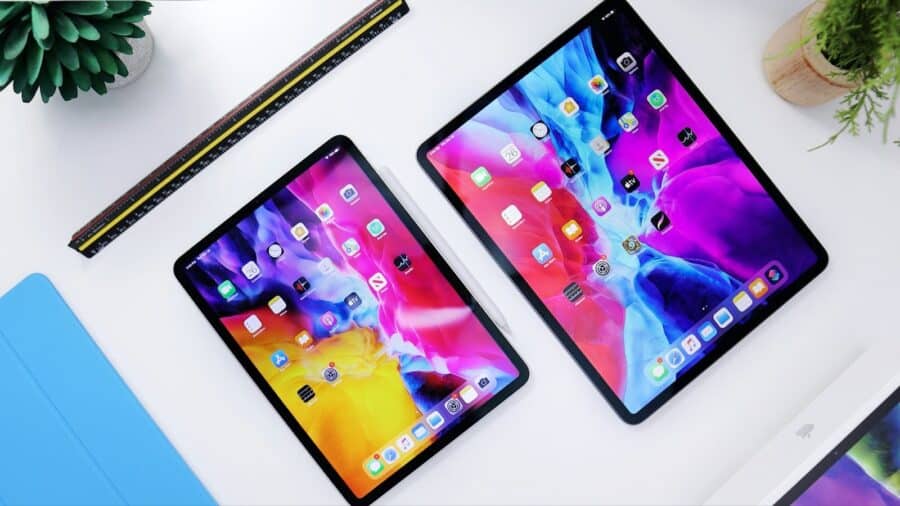

Choosing the right tablet in 2025 can feel overwhelming with the vast array of options available across different price points, operating systems, and form factors. From Apple’s latest M4 iPad Pro to budget-friendly Amazon Fire tablets, the market offers something for everyone. However, the best tablet needs to fit your needs and your budget, and making the right choice requires understanding your specific requirements and how different features align with your intended usage.
Understanding Your Primary Use Case
 Before diving into specifications and comparisons, the most crucial step is identifying how you plan to use your tablet. This fundamental question will guide every subsequent decision in your buying process.
Entertainment and Media Consumption
If your primary goal is watching movies, browsing social media, reading e-books, or casual gaming, you don’t need the most powerful or expensive tablet. Mid-range options typically provide excellent displays and sufficient performance for these activities. Tom’s Guide experts recommend considering what apps you want to use since performance similarities across many tablets mean app selection often becomes the deciding factor.
Productivity and Professional Work
For business tasks, document editing, video conferencing, or creative work, you’ll need more processing power, better multitasking capabilities, and possibly keyboard and stylus support. Tablets in this category should offer laptop-replacement potential with robust performance and professional software compatibility.
Education and Learning
Students require tablets that balance portability, battery life, note-taking capabilities, and access to educational apps. The ability to annotate documents, run educational software, and maintain long battery life becomes essential.
Creative and Design Work
Artists, designers, and content creators need tablets with precise stylus support, color-accurate displays, powerful processors for handling large files, and specialized creative applications.
Screen Size: Finding Your Sweet Spot
Screen size significantly impacts both usability and portability, making it one of the most important decisions in tablet selection.
Small Tablets (7-8 inches)
Tablets that feature 7-inch or 8-inch screens are best for portability. These compact devices usually weigh under a pound and easily slip into purses or bags. They’re ideal for:
- E-reading: Lightweight design prevents hand fatigue during extended reading sessions
- Travel: Minimal space and weight impact
- Basic tasks: Web browsing, email, social media
- Budget-conscious buyers: Often the most affordable options
However, small screens can make productivity tasks challenging and may feature lower-powered processors and reduced storage capacity.
Mid-Size Tablets (9-11 inches)
Mid-size tablets offer the optimal balance between portability and functionality. They’re perfect for:
- All-around use: Suitable for both entertainment and light productivity
- Family sharing: Good size for multiple users
- Students: Adequate screen real estate for reading and note-taking
- Travel workers: Portable enough for mobile use while providing sufficient workspace
Large Tablets (12+ inches)
Tablets that offer screens 12 inches in size and larger are meant to be laptop alternatives, focusing on business use and productivity. They excel at:
- Professional work: Multiple applications simultaneously
- Creative tasks: Digital art, video editing, photo manipulation
- Media consumption: Immersive movie watching and gaming
- Laptop replacement: Full productivity capabilities
The trade-off is significantly reduced portability and higher prices.
Operating System Selection
Your choice of operating system profoundly impacts available applications, user interface, and ecosystem integration.
iPadOS (Apple iPads)
iPadOS offers the most refined tablet experience with:
Advantages:
- Optimized apps: Over 1.5 million iPad-specific applications
- Long-term support: 6-7 years of software updates
- Premium hardware: Consistent build quality and performance
- Ecosystem integration: Seamless connection with iPhone, Mac, and other Apple devices
- Creative applications: Industry-leading apps like Procreate, Adobe Creative Suite
Considerations:
- Higher cost: Premium pricing across the entire lineup
- Limited customization: Closed ecosystem with restricted flexibility
- File management: Less traditional file system access compared to other platforms
Android
Android tablets provide flexibility and variety:
Advantages:
- Price diversity: Options from budget to premium
- Customization: Extensive personalization options
- Google services integration: Native Google Workspace and Play Store access
- Hardware variety: Multiple manufacturers and form factors
- Expandable storage: Many models support microSD cards
Considerations:
- App optimization: Inconsistent tablet-specific app development
- Update fragmentation: Varying update policies across manufacturers
- Quality variance: Wide range of build quality and performance levels
Windows
Windows tablets blur the line between tablets and laptops:
Advantages:
- Full desktop applications: Complete Windows software compatibility
- Professional software: Industry-standard applications for business and creative work
- Keyboard and mouse support: Traditional productivity tools
- Multiple windows: True multitasking capabilities
Considerations:
- Touch optimization: Many applications not designed for touch interfaces
- Battery life: Generally shorter than iPad or Android alternatives
- Price: Premium pricing for capable models
Performance Considerations
Processing power requirements vary dramatically based on intended use.
Entry-Level Performance
For basic tasks like web browsing, email, reading, and video streaming, entry-level processors provide adequate performance. Consumer Reports notes that tablets with basic specs can handle streaming Netflix or Disney+, simple games, and social media effectively.
Mid-Range Performance
For multitasking, moderate gaming, productivity applications, and light creative work, mid-range processors offer the best price-to-performance ratio.
High-End Performance
Professional creative work, video editing, 3D rendering, high-end gaming, and laptop replacement scenarios require top-tier processors like Apple’s M-series chips or premium Android processors.
Display Quality and Technology
Display characteristics significantly impact user experience across all use cases.
Resolution and Pixel Density
Higher resolution displays provide sharper text and images. Consider:
- 1080p (Full HD): Adequate for smaller screens and basic use
- 1440p (QHD): Ideal for mid-size tablets and productivity work
- 4K: Premium option for large screens and professional creative work
Display Technology
- LCD: More affordable, good color accuracy, adequate brightness
- OLED/AMOLED: Superior contrast ratios, deeper blacks, more vibrant colors
- Mini-LED: Excellent brightness and contrast, premium option
- E Ink: Specialized for reading, exceptional battery life, outdoor visibility
Additional Display Features
- High refresh rates (120Hz): Smoother scrolling and responsive stylus input
- Color accuracy: Important for creative professionals
- Brightness levels: Essential for outdoor use
- Anti-reflective coatings: Reduce glare in various lighting conditions
Storage and Memory Requirements
Storage needs vary significantly based on usage patterns and available cloud services.
Storage Capacity
- 32-64GB: Adequate for basic use with cloud storage reliance
- 128-256GB: Comfortable for most users with moderate app and media storage
- 512GB+: Professional use, large media libraries, offline content storage
RAM Considerations
- 4-6GB: Basic multitasking and simple applications
- 8-12GB: Smooth multitasking and moderate professional applications
- 16GB+: High-end creative work and extensive multitasking
Expandable Storage
Many Android tablets support microSD cards, allowing storage expansion. Apple iPads do not support expandable storage, making initial capacity selection critical.
Battery Life and Charging
Battery performance affects mobility and productivity significantly.
Battery Life Expectations
Consumer Reports testing shows most tablets achieve at least 10 hours of battery life, though usage patterns dramatically impact actual performance:
- Video streaming: 8-12 hours typically
- Web browsing: 10-15 hours commonly
- Gaming: 4-8 hours depending on intensity
- Productivity work: 8-12 hours for office applications
Charging Considerations
- Charging speed: Fast charging reduces downtime
- USB-C vs. proprietary: USB-C offers universal compatibility
- Wireless charging: Convenience feature on premium models
Connectivity Options
Connection capabilities affect usability in different environments.
Wi-Fi vs. Cellular Models
Wi-Fi Only:
- Advantages: Lower cost, adequate for home/office use
- Limitations: Requires Wi-Fi access for internet connectivity
Cellular Models:
- Advantages: Internet access anywhere with cellular coverage
- Considerations: Higher purchase price, ongoing data plan costs
Port Selection
- USB-C: Modern standard, versatile connectivity
- Lightning: Apple’s proprietary connector
- Headphone jack: Increasingly rare but useful for audio
- Expandable storage slots: microSD support on some Android models
Accessories and Ecosystem Integration
Accessories can transform tablet functionality significantly.
Keyboards
- Detachable keyboards: Laptop-like typing experience
- Folio keyboards: Protection and typing in one accessory
- Bluetooth keyboards: Flexible positioning options
Styluses
- Active styluses: Pressure sensitivity and palm rejection for creative work
- Basic styluses: Simple navigation and note-taking
- Compatibility: Ensure stylus works with your chosen tablet
Cases and Stands
- Protective cases: Essential for durability
- Stand functionality: Hands-free viewing angles
- Keyboard integration: Combined protection and productivity
Budget Considerations and Value Assessment
Tablet pricing spans from under $100 to over $2,000, requiring careful value evaluation.
Budget Categories
Under $200: Amazon’s Fire tablets or similar budget options provide basic functionality for simple tasks.
$200-$500: Mid-range tablets offering good performance for most users, including entry-level iPads and quality Android options.
$500-$1,000: Premium tablets with high-end features, suitable for professional and creative use.
$1,000+: Top-tier models with cutting-edge technology and maximum performance.
Value Considerations
- Longevity: How long will the tablet receive software updates?
- Resale value: Some brands maintain value better than others
- Total cost of ownership: Include accessories and potential data plans
- Upgrade frequency: How often do you typically replace devices?
Making Your Final Decision
After evaluating all factors, use this framework to narrow your choices:
Step 1: Define Your Primary Use Case
Clearly identify whether you need the tablet for entertainment, productivity, creativity, education, or a combination.
Step 2: Set Your Budget Range
Establish realistic spending limits including necessary accessories.
Step 3: Choose Your Ecosystem
Decide between iPad, Android, or Windows based on your existing devices and preferences.
Step 4: Select Screen Size
Balance portability needs with usability requirements.
Step 5: Evaluate Performance Requirements
Match processor and RAM specifications to your intended applications.
Step 6: Consider Long-term Value
Factor in software support duration, build quality, and upgrade potential.
Top Recommendations by Category
Best Overall Value
iPad Air (M3) – The recently refreshed iPad Air remains the Apple tablet experts recommend to most people, offering an excellent balance of performance, features, and price.
Best Budget Option
Amazon Fire HD 10 – Provides essential tablet functionality at an extremely accessible price point.
Best for Productivity
Microsoft Surface Pro – Full Windows compatibility with laptop-level performance in tablet form.
Best for Creativity
iPad Pro (M4) – Industry-leading performance with the best creative application ecosystem.
Best Android Tablet
Samsung Galaxy Tab S10 Plus – Premium Android experience with S Pen included and water resistance.
Best Small Tablet
iPad Mini – If you want a compact tablet that you can fit in a jacket pocket, the iPad mini isn’t just the best small tablet you can buy, it’s one of the only small tablets worth buying.
Future-Proofing Your Purchase
Consider these factors for long-term satisfaction:
Software Support Duration
Choose tablets from manufacturers with strong update track records. Apple typically provides 6-7 years of support, while Android support varies by manufacturer.
Performance Headroom
Select slightly more powerful specifications than currently needed to accommodate future software requirements and feature additions.
Connectivity Standards
Prioritize tablets with current connectivity options like USB-C, Wi-Fi 6, and 5G capability for future compatibility.
Build Quality
Invest in durable construction and consider protection options to maximize device lifespan.
Common Mistakes to Avoid
Overbuying for Basic Needs
Don’t purchase premium features you won’t use. Basic tablets adequately handle simple tasks at significantly lower costs.
Underestimating Storage Requirements
Consider how you’ll use the tablet over time. Photo storage, app installations, and offline content can quickly fill limited storage.
Ignoring Ecosystem Lock-in
Consider how your tablet choice affects future device purchases and service subscriptions.
Forgetting Accessory Costs
Factor keyboard, stylus, and case costs into your budget. These accessories often significantly enhance usability.
Neglecting Ergonomics
Consider weight, thickness, and size for your typical usage scenarios. A tablet that’s uncomfortable to hold will see limited use.
Choosing the right tablet requires balancing multiple factors including intended use, budget constraints, ecosystem preferences, and feature priorities. The good news is that today’s tablet market offers capable devices across all price ranges, ensuring excellent options regardless of your specific requirements.
The key to making the right choice lies in honest assessment of your needs rather than purchasing based on specifications alone. A $200 tablet that perfectly meets your requirements provides better value than a $1,000 device with unused capabilities.
Take time to research specific models within your chosen category, read professional reviews, and if possible, experience devices hands-on before purchasing. The tablet market continues evolving rapidly, with regular improvements in performance, battery life, and features, ensuring that whatever choice you make today will serve you well for years to come.
Remember that the perfect tablet is the one that seamlessly integrates into your lifestyle, enhances your productivity or entertainment experience, and provides reliable performance within your budget constraints. With careful consideration of the factors outlined in this guide, you’ll be well-equipped to make an informed decision that meets your unique needs and preferences.